Capture & OrganizeYour Web Highlights
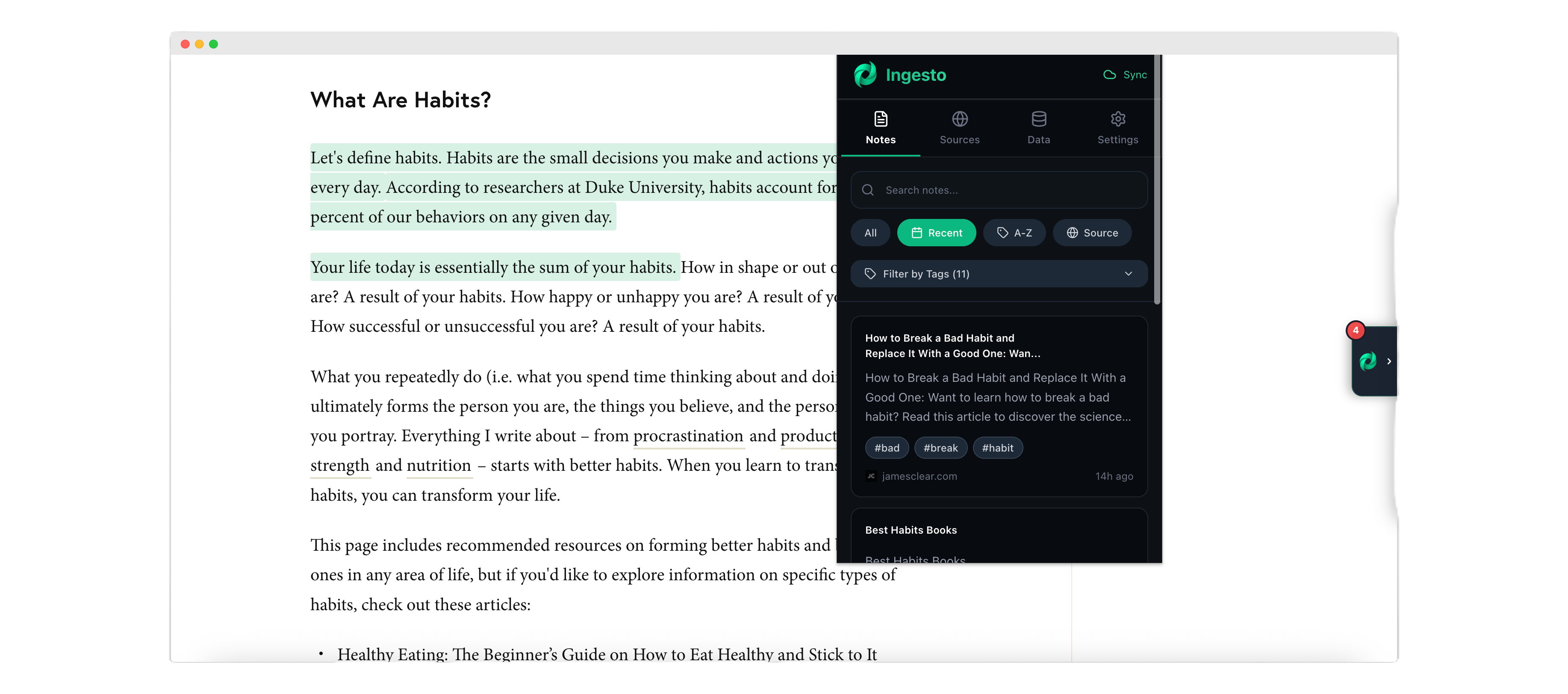
Ingesto is a modern web clipper and highlight saver that lets you instantly save text, collect notes, and organize content from any website. All stored locally, all private.

Powerful Features
For Modern Web Research
Everything you need to capture, organize, and search your web highlights efficiently.
Four Capture Methods
Text selection popup, context menu, quick add (Alt+N), or keyboard shortcuts (Ctrl+Shift+S). Choose what works best for you.
Powerful Offline Search
Full-text search powered by MiniSearch. Filter by tags and sources. Find anything instantly, even offline.
Smart Auto-Tagging
Automatic tag generation from note content. Click tags to filter. Organize thousands of notes effortlessly.
Source Management
Browse all websites you've saved from. See note counts, favicons, and last seen dates. Click to filter notes by source.
Export & Import
Export to JSON (full backup), Markdown (readable), or CSV (spreadsheet). Import JSON to restore or migrate data.
100% Local Storage
All data stored locally in IndexedDB. Optional cloud sync available. Your notes never leave your device unless you choose.
Keyboard Shortcuts
Alt+N (quick add), Alt+F (search), Ctrl+Shift+S (save selection), Delete/Backspace (remove highlight). Full keyboard control.
Privacy-First Design
No tracking, no telemetry, no external requests. Works completely offline. Guest mode available. Your data, your control.
Four Ways to Capture
Choose Your Workflow
Ingesto offers multiple capture methods to fit your workflow. From quick selections to manual notes, we've got you covered.
Text Selection
Click & SelectSelect any text on a webpage. A micro-popup appears with Save, Edit, or Close options. Perfect for quick captures.
Context Menu
Right-ClickRight-click on selected text and choose "Save to Ingesto" from the context menu. Works on any webpage.
Quick Add
Alt+NPress Alt+N or click the + button in the Notes tab. Manually add notes with full editing capabilities.
Keyboard Shortcut
Ctrl+Shift+SSelect text and press Ctrl+Shift+S (or Alt+Shift+S) to save instantly. No popup, immediate capture.
How It Works
Get started with Ingesto in just four simple steps. Capture, organize, and find your web highlights effortlessly.
Select & Capture
Highlight any text on any webpage. A micro-popup appears with Save, Edit, or Close options. Or use context menu, quick add, or keyboard shortcuts.
Auto-Organize
Ingesto automatically generates tags from your content and tracks the source URL. Notes are organized by website, making retrieval effortless.
Browse & Filter
View all notes in the Notes tab. Filter by tags, sources, or date. Use infinite scroll to browse thousands of notes seamlessly.
Search & Retrieve
Use powerful full-text search (Alt+F) to find any note instantly. Filter results by tags or sources. Works completely offline.
Organized Interface
Four Powerful Tabs
Ingesto's clean interface is organized into four main tabs, each designed for a specific purpose.
Notes
Browse all your saved notes with infinite scroll. Filter by tags, sources, or date. Sort by recent, alphabetical, or source. Click any note to edit or delete.
- •Infinite scroll
- •Tag filtering
- •Source filtering
- •Date sorting
- •Quick search
Sources
View all websites you've saved notes from. See favicons, note counts, and last seen dates. Click any source to filter notes by that website.
- •Source list
- •Favicon display
- •Note counts
- •Last seen dates
- •Quick filtering
Search
Powerful full-text search powered by MiniSearch. Filter results by tags or sources. Works completely offline. Press Alt+F to open instantly.
- •Full-text search
- •Tag filters
- •Source filters
- •Offline capable
- •Instant results
Data
Export to JSON, Markdown, or CSV. Import JSON files. View storage usage. Optional cloud sync for authenticated users. Clear all data if needed.
- •Export formats
- •Import JSON
- •Storage info
- •Cloud sync
- •Data management
Keyboard Shortcuts
Work Faster, Capture More
Master Ingesto with these powerful keyboard shortcuts. Speed up your workflow and capture notes without touching your mouse.
Quick Add Note
Open the quick add modal to manually create a note
Open Search
Open the extension with search focused
Save Selection
Save currently selected text as a note (Windows/Linux)
Save Selection
Save currently selected text as a note (Alternative/Mac)
Delete Highlight
Delete a note when hovering over its highlight on a webpage
Delete Highlight
Delete a note when hovering over its highlight on a webpage
Why Choose Ingesto?
Built for researchers, students, and content creators who value privacy and efficiency.
Privacy-First
All your data stays on your device. Optional cloud sync available. No tracking, no telemetry, no external requests. Guest mode supported.
Lightning Fast
Offline search powered by MiniSearch means instant results, even with thousands of notes. Infinite scroll for seamless browsing.
Fully Organized
Auto-tagging and source tracking help you stay organized without any manual work. Filter by tags, sources, or dates with one click.
Install Ingesto
Start Capturing Today
Available for Chrome, Firefox, and Edge. Install in seconds and start capturing your web highlights.
Frequently Asked
Questions
Find answers to common questions about Ingesto.
Ready to Get Started?
Install Ingesto today and start capturing your web highlights with ease.
Install Extension